

The stable version of ‘Nothing OS 5,’ based on Android 17, has begun rolling out globally to smartphones, marking a new chapter in the company’s software journey. The update, which commenced on October 12, first reached their flagship device, the ‘Nothing Phone (3).’
The design-focused team, led by Carl Pei, has been working with remarkable speed; they have brought a unique blend of transparent aesthetics, advanced rear-lighting control, and on-device machine learning technology to their expanding hardware lineup.
While many software updates within the Android ecosystem often look similar, ‘Nothing’ has consistently prioritized interface design as an integral part of its brand identity. Rather than obscuring Google’s core platform behind heavy or complex layers, the company has further refined its signature minimalist aesthetic in this version. At the same time, they have seamlessly integrated useful and intelligent features from other operating systems.

Transparent Glass and Smarter Glanceable Widgets
The visual identity of Nothing OS 5 places a strong emphasis on ‘glassmorphism’ and elements designed for everyday utility. The home screen now features transparent interface components alongside a reorganized search bar. While this design echoes styles seen in iOS 27, ColorOS 17, and OriginOS 7, it retains Nothing’s signature monochrome aesthetic and dot-matrix design language.

A new ‘all-in-one’ clock widget has been introduced, resulting in a cleaner and more organized screen layout. This single widget consolidates essential daily information, including:
- Current time and date
- Hyper-local, real-time weather updates
- Upcoming calendar appointments or scheduled events
Artificial Intelligence (AI) has also been integrated into the personalization experience through ‘Lucent AI Wallpapers.’ Built directly into the system settings, this feature allows users to generate custom live wallpapers using simple text prompts, without the need for third-party web apps or additional subscriptions.
Expanding the Glyph Interface
In the Nothing OS 5 update, Nothing’s signature rear lighting array has received its most functional upgrade to date. The most notable addition is a dedicated ‘Glyph Customizer,’ now available as a standalone application. Users can create, configure, and assign custom light patterns, complete with precise timing, to specific app notifications, system alerts, and custom ringtones.
A new ‘Glyph Timer‘ widget brings a tangible countdown to the back of the phone. When you set a timer from the home screen, the rear light strips gradually dim to show real-time progress, finally flashing to signal that the time is up.
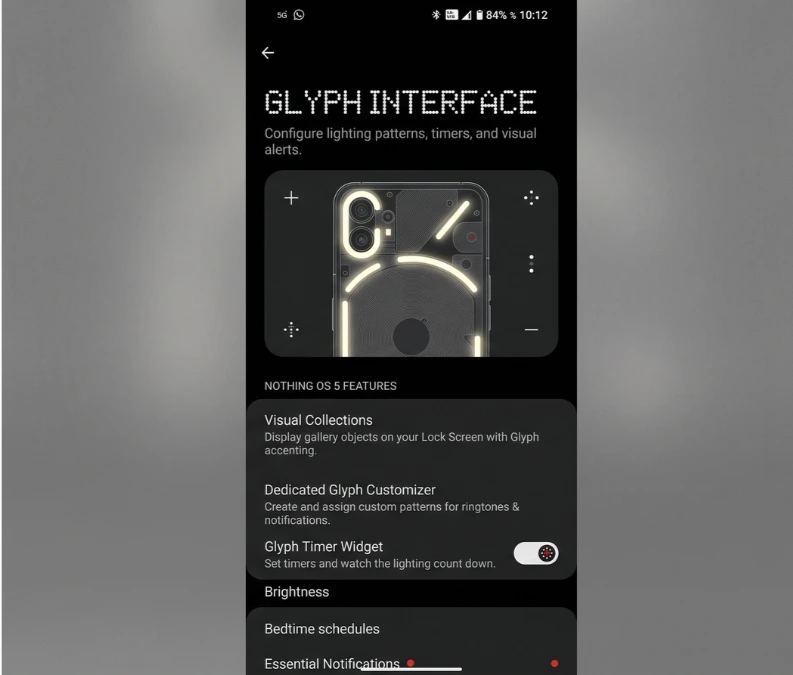
Photography has also been integrated directly into the back panel through a visual collection feature. The Gallery app can now automatically isolate the main subjects from your photos, allowing you to pin them directly to your lock screen or home screen, complemented by subtle, synchronized pulses from the Glyph lights.
Essential Space: Nothing’s Take on ‘On-Device AI’
Instead of adding a standard conversational chatbot to the operating system, Nothing OS 5 introduces “Essential Space.” Positioned as a centralized smart hub on the home screen, this feature elevates the concept of “smart capture” far beyond a simple physical shortcut button.
Essential Space functions as a personal command center that integrates three core capabilities:
- Multi-modal Capture: Instantly captures and catalogs voice memos, displays screenshots, and facilitates quick photo-taking.
- On-device Intelligence: Utilizes Nothing’s own lightweight AI model, running directly on the hardware, to transcribe voice notes, generate summaries in bullet points, and outline actionable next steps.
- Unified Dashboard: Consolidates all recorded audio, processed text, and media clips into an encrypted, searchable vault, allowing for quick retrieval.
By processing data locally, this hub minimizes battery consumption and protects user privacy, while simultaneously serving as an efficient digital notepad.
Under-the-Hood Tuning and Quick Settings
Beyond the visible changes, the system software incorporates targeted resource optimizations. A refined background app retention engine terminates unnecessary tasks, ensuring smarter utilization of available RAM and SoC bandwidth. Touch response latency has also been reduced across the entire UI, making gestures, app launches, and system animations feel smoother and more fluid.
Similarly, everyday connectivity has been enhanced to provide a more seamless experience. Simplified Bluetooth controls within the Quick Settings panel now allow users to access advanced device pairing and audio-routing configurations with a single tap, eliminating the need to navigate to the full system settings menu.
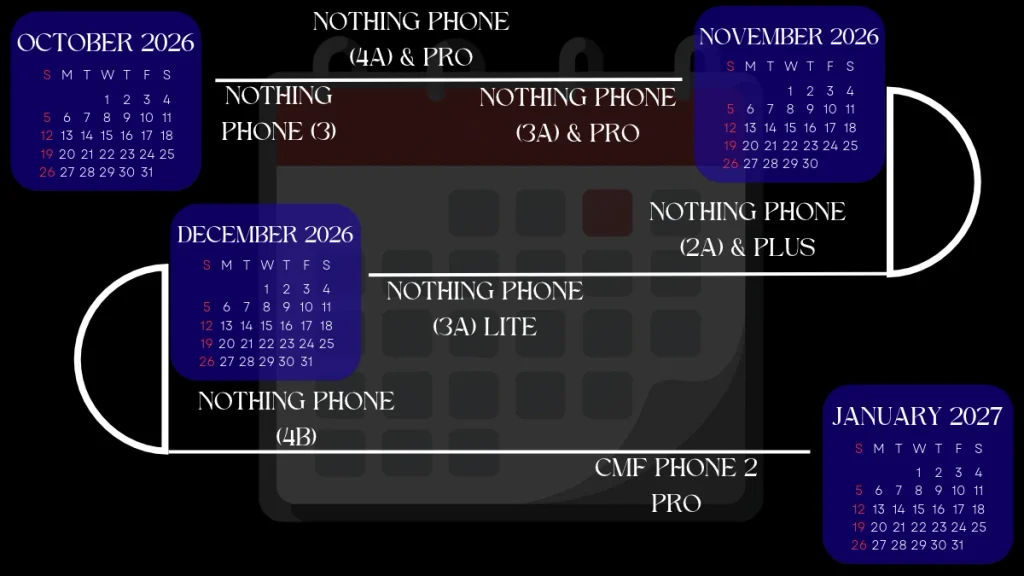
Nothing OS 5 Release Timeline and Eligible Models
The software has already been released for the flagship ‘Nothing Phone (3)’; however, for other devices from the company, it will be rolled out in phases between late 2026 and early 2027. If you would like to know when this update will arrive on your device, the complete official roadmap is provided here.
| Release Window | Eligible Model |
|---|---|
| October 12, 2026 | Nothing Phone (3) |
| November 2026 | Nothing Phone (4a) Pro |
| Nothing Phone (4a) | |
| Nothing Phone (3a) Pro | |
| Nothing Phone (3a) | |
| Nothing Phone (2a) | |
| Nothing Phone (2a) Plus | |
| December 2026 | Nothing Phone (3a) Lite |
| January 2027 | Nothing Phone (4b) |
| CMF Phone 2 Pro |
By positioning mid-range models, such as those in the ‘Phone (2a)’ and ‘Phone (3a)’ series, immediately after its flagship products, ‘Nothing’ has adopted a strategy to deliver updates with great speed.
The stable version of ‘Nothing OS 5’ is currently being rolled out; consequently, users will begin receiving notifications for OTA (over-the-air) updates on their devices over the coming weeks, following a phased schedule.