



A good wireless gaming mouse under ₹1500 removes desk clutter and cable drag without forcing you to compromise on tracking performance. A few years ago, budget wireless mice meant heavy bodies, AA batteries, and laggy 125Hz office sensors. Today, sub-₹1,500 gaming mice deliver 1000Hz polling rates (via a 2.4GHz dongle), rechargeable USB-C batteries, PTFE glide feet, and even tri-mode connectivity so you can switch from a gaming PC to a work laptop in seconds. Whether you play Valorant, CS2, GTA V, or single-player RPGs, upgrading to a modern budget wireless mouse gives you smoother flicks, a clean desk setup, and reliable performance, all for less than the cost of a single AAA game.
- Quick Picks: Best Wireless Gaming Mice At a Glance
- Best Wireless Gaming Mouse Under ₹1500: Top 6 picks
- Cosmic Byte Helios Tri-Mode
- Kreo Hawk Pro Wireless
- EvoFox Banshee 2 Tri-Mode
- EvoFox Shadow X Pro
- Redragon Predator Pro (M612 Pro)
- Ant Esports GM380 V2
- How to Choose the Right Wireless Gaming Mouse Under ₹1500
- Compare all 6 Gaming Mouse at a glance
- Helpful Answers to Common Buyer Questions
- Frequently Asked Questions (FAQ)
Quick Picks: Best Wireless Gaming Mice At a Glance
| Picks | Best For |
|---|---|
| Cosmic Byte Helios Tri-Mode | Best overall value for most gamers |
| Kreo Hawk Pro Wireless | FPS players & macro-heavy setups |
| EvoFox Banshee 2 Tri-Mode | Best sensor & multi-device power users |
| EvoFox Shadow X Pro | Best Under ₹1,000 |
| Redragon Predator Pro (M612 Pro) | Best for Large Hands & MMO Games |
| Ant Esports GM380 V2 | Tightest budget / students |
Best Wireless Gaming Mouse Under ₹1500: Top 6 picks
Cosmic Byte Helios Tri-Mode
My Opinion: At ₹999, the Cosmic Byte Helios is the easiest mouse on this list to recommend. Most sub-₹1,000 wireless mice force you to give up either software support, 1000Hz polling, or decent glide feet. The Helios keeps all three while staying comfortably light at 81 grams. While its 60 IPS (inches per second) sensor might not fully satisfy e-sports players who move their mouse rapidly across the desk at very low sensitivity, for 90% of budget gamers, it performs reliably every single day.
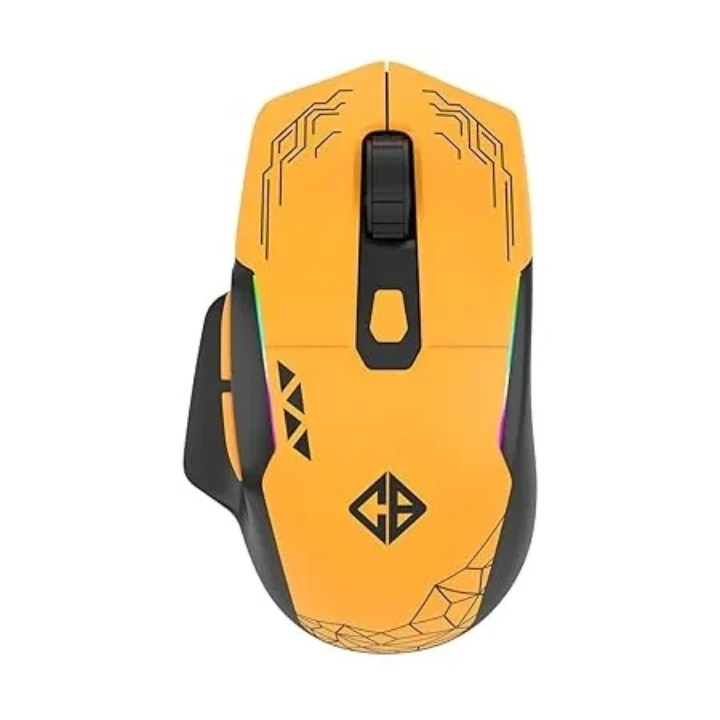
Cosmic Byte Helios Tri-Mode
2.4GHz Wireless + Bluetooth Gaming Mouse | 10,000 DPI | 1000Hz Polling | Huano 10M | 5 Programmable Buttons | RGB | Lightweight 81g | PTFE
Pros and Cons
What I Like:
What I Don’t Like:
My Comprehensive Review
The Cosmic Byte Helios is built for budget gamers who want a hassle-free, versatile mouse. Its FR2012 + S203 sensor supports 800 to 10,000 DPI, offering smooth cursor movement for MOBAs, battle royales, and everyday productivity. Compared to the EvoFox Shadow X Pro at the same ₹999 price, the Helios gives you a larger 500mAh battery and slightly higher max DPI. Although the Kreo Hawk Pro offers a significantly faster tracking speed (120 IPS vs. 60 IPS), the Helios costs ₹500 less, making it the stronger all-round value pick.
Key Specifications
Kreo Hawk Pro Wireless
My Opinion: The Kreo Hawk Pro justifies its ₹1,499 price tag by fixing the biggest weakness of cheaper budget mice: sensor spin-out. With 120 IPS and 25G acceleration, it makes a noticeable difference during rapid mouse movements in games like Valorant or Apex Legends. Additionally, with eight programmable buttons, a 500mAh battery, and clean USB-C tri-mode connectivity, it stands well above typical entry-level mice, delivering performance that rivals mid-range devices.
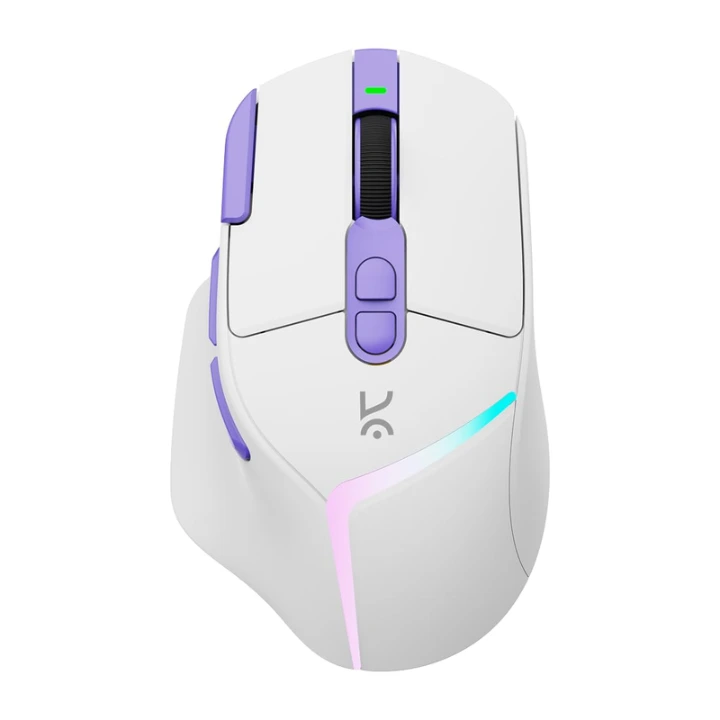
Kreo Hawk Pro Wireless Gaming Mouse
1000Hz Polling, 2.4GHz, Bluetooth, USB-C, 8 Programmable Buttons, RGB Strip, 500mAh
Pros and Cons
What I Like:
What I Don’t Like:
My Comprehensive Review
The Kreo Hawk Pro is primarily designed for gamers who want sharper tracking and faster input response without stepping into the ₹2,000+ bracket. Its 120 IPS rating offers double the tracking capability of the Cosmic Byte Helios, making it much safer for low-sensitivity settings. Compared to the Redragon Predator Pro, the Hawk Pro features a cleaner, more modern ‘tri-mode’ setup, along with a USB-C port and PTFE skates, though Redragon still holds a slight edge in raw button count (9 vs. 8). If your budget is up to ₹1,499, this is the most well-balanced option in terms of performance.
Key Specifications
More Read

EvoFox Banshee 2 Tri-Mode
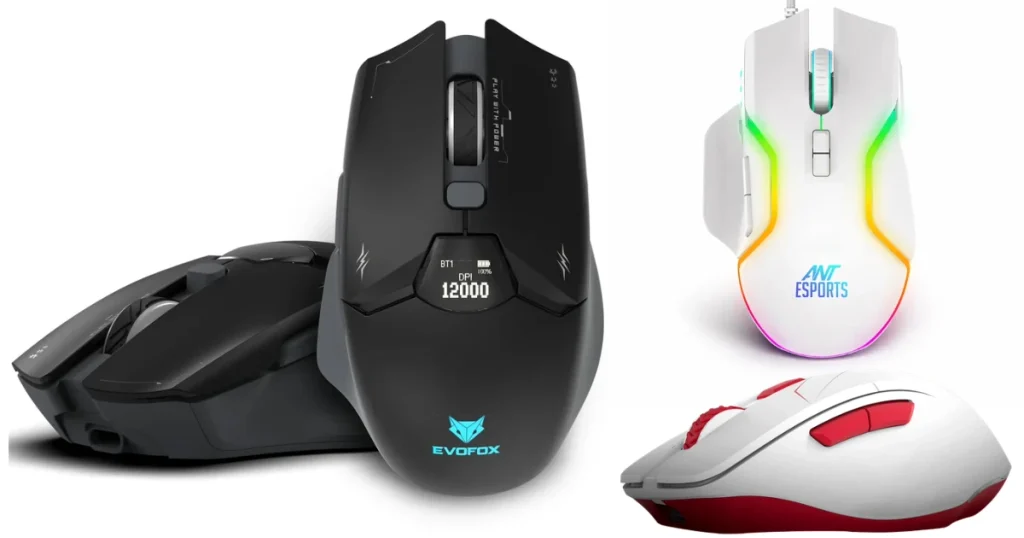
My Opinion: Getting a PixArt 3311 sensor under ₹1,500 is rare, and that alone makes the EvoFox Banshee 2 worth hunting on sale. The small LCD screen included is not just a gimmick; it is actually quite useful, allowing you to check battery status or DPI settings without needing to open any software. The only catch is its smart polling split: you get 1000Hz wired, 500Hz on 2.4GHz, and 133Hz on Bluetooth. Most players won’t feel a 1ms difference between 500Hz and 1000Hz, though competitive purists should note it.

EvoFox Banshee 2 Tri-Mode
2X BT, 2.4G & Wired, PixArt 3311 Sensor, 1000Hz Polling Rate, 12,000 DPI, LCD Display, 6 Programmable Buttons, Software Support
Pros and Cons
What I Like:
What I Don’t Like:
My Comprehensive Review
The EvoFox Banshee 2 is the enthusiast pick of this roundup. The PixArt 3311 sensor delivers noticeably better tracking consistency than the Instant S203/S205 sensors in the Cosmic Byte Helios and EvoFox Shadow X Pro. It also beats both in connectivity by offering two separate Bluetooth channels. The trade-off is price stability and 500Hz wireless polling, so if you play strictly wireless FPS and want 1000Hz at all times, stick with the Kreo Hawk Pro. If you spot the Banshee 2 around ₹1,299, grab it immediately.
Key Specifications
EvoFox Shadow X Pro
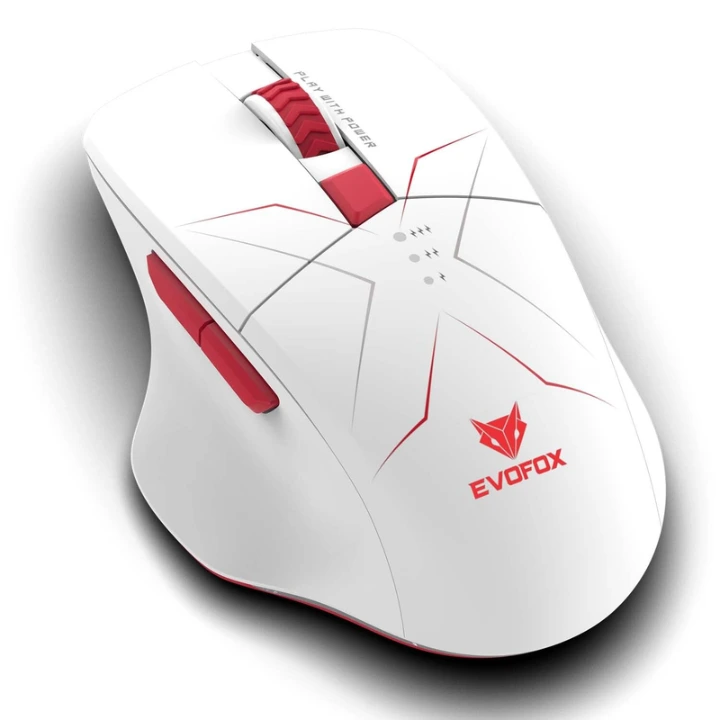
My Opinion: The buttons on the EvoFox Shadow X Pro are excellent and feel comfortable to the touch. In many budget-friendly gaming mice, buttons often feel vague or ‘mushy’ when pressed, or they develop a ‘double-click’ issue after just a few months of use. To address this, the EvoFox Shadow X Pro, priced at ₹999, utilizes durable ‘Huano’ switches, rated for up to 10 million clicks, which is certainly a reassuring feature. It also includes onboard memory, allowing you to configure lighting and macros on a Windows PC and carry those settings over to other computers. Its 400mAh battery requires slightly more frequent charging than the Cosmic Byte Helios, yet it remains a rock-solid sub-₹1,000 buy.
EvoFox Shadow X Pro
Gaming Mouse Tri-Mode Rechargeable | BT, USB 2.4G & Wired, S203 Sensor, 1000Hz Polling Rate, 6400 DPI, RGB Lighting, 6 Programmable Buttons, Software Support
Pros and Cons
What I Like:
What I Don’t Like:
My Comprehensive Review
The EvoFox Shadow X Pro goes head-to-head with the Cosmic Byte Helios at ₹999. Both use the Instant S203 sensor family and offer tri-mode 1000Hz performance. Choose the Shadow X Pro if you prioritize onboard profile memory and Huano 10M switch durability. Choose the Cosmic Byte Helios if you want a slightly larger 500mAh battery and PTFE feet out of the box. Either way, both easily outperform ultra-budget mice like the Ant Esports GM380 V2 in customization.
Key Specifications
Redragon Predator Pro (M612 Pro)
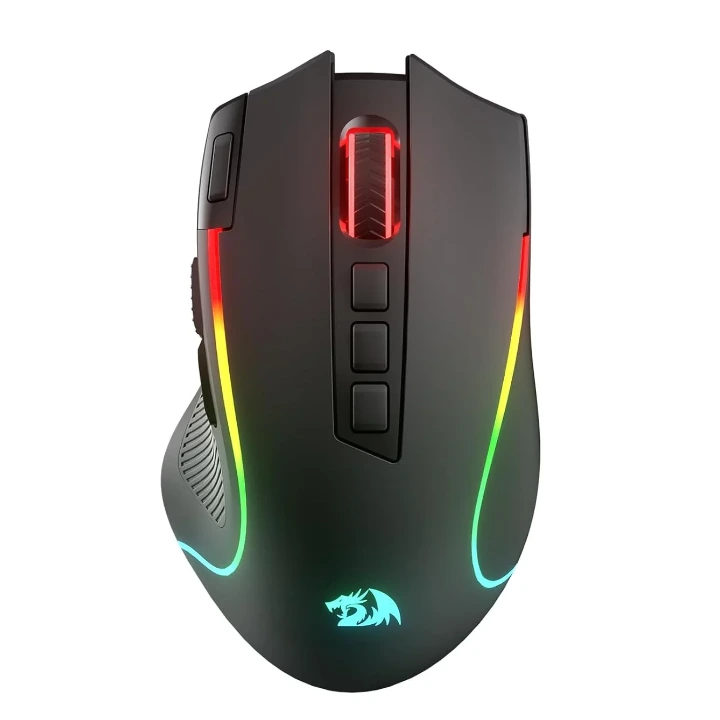
My Opinion: Redragon has a strong reputation for durable budget peripherals, and the M612 Pro lives up to it. It isn’t chasing the ultra-lightweight esports trend; instead, it focuses on a comfortable feel in the hand and functional button layouts. Having nine remappable keys at around ₹1,100 makes it fantastic for games with heavy ability rotations or even video editing timelines. If you play fast-paced shooters, look lighter; but if you value comfort and extra buttons, this is an ideal choice.
Redragon Predator Pro (M612 Pro)
8000 DPI Wired/Wireless Optical Gamer Mouse with 9 Programmable Buttons & 7 Backlit Modes, BT & 2.4G Wireless, Software Supports DIY Keybinds Rapid Fire Button
Pros and Cons
What I Like:
What I Don’t Like:
My Comprehensive Review
The Redragon Predator Pro fills a clear gap in the sub-₹1,500 market. While the Cosmic Byte Helios and Ant Esports GM380 V2 prioritize a lightweight design, the M612 Pro prioritizes ergonomics and button count. Compared to the Kreo Hawk Pro (8 buttons), the Redragon costs roughly ₹300–₹400 less and feels fuller in a large palm, though Kreo retains the edge in tracking for competitive FPS games. For RPGs, MMOs, and all-day work-plus-gaming setups, the Predator Pro is hard to beat.
Key Specifications
More Read
Ant Esports GM380 V2
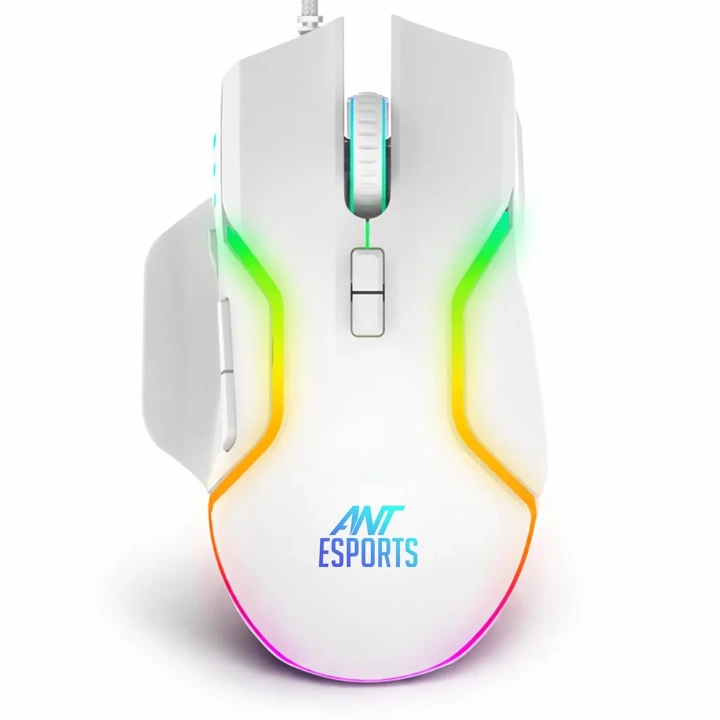
My Opinion: When buying a wireless gaming mouse for under ₹600, you usually have to make some compromises, such as dealing with lag caused by a 125Hz polling rate or a build made of flimsy plastic. The ‘Ant Esports GM380 V2’, however, is an exception. It features a 2.4GHz dongle-based connection with a 1000Hz polling rate, a 500mAh battery that lasts up to 72 hours, and a lightweight design weighing only 75 grams. Although it lacks software customization options and uses a basic 4000 FPS optical sensor, it remains an excellent choice as a budget-friendly backup mouse or for beginners, all for the price of a movie ticket and a light snack.
Ant Esports GM380 V2
8 Programmable Buttons | 12800 DPI I Ergonomic Design with Braided Cable
Pros and Cons
What I Like:
What I Don’t Like:
My Comprehensive Review
The Ant Esports GM380 V2 is designed for buyers who simply don’t want to spend more than ₹1,000. It lacks features like dedicated software, extra macro keys, or high-end sensors, as well as a lightweight design, long battery life, and fast 2.4GHz response. If you can increase your budget by ₹400 more, you might consider the Cosmic Byte Helios or the EvoFox Shadow X Pro, both of which offer better customization options and superior sensors. However, if ₹600 is your absolute maximum budget, it would be difficult to find another model that matches the specifications of the GM380 V2 at this price point.
Key Specifications
How to Choose the Right Wireless Gaming Mouse Under ₹1500
Finding the best wireless gaming mouse under ₹ 1500 can be quite difficult, as many brands plaster “12,000 DPI” on stickers on mediocre hardware. Instead, focus on these five specs:
Aim for 1000Hz on 2.4GHz: Polling rate is a measure of how frequently your mouse sends its position data to your PC. A rate of 1000 Hz (1 millisecond) feels quite fast and smooth, whereas 125 Hz (8ms) can feel sluggish during gameplay, especially in shooter games. For gaming, always use a 2.4 GHz USB dongle, while for office tasks or web browsing, use Bluetooth.
Don’t Chase DPI Alone: High DPI numbers don’t mean accuracy. Instead, focus on the specific sensor model (such as the PixArt 3311 or Instant S205/S203) and check its IPS (Inches Per Second) rating. Higher IPS (like 120 IPS on the Kreo Hawk Pro) prevents the cursor from spinning out during fast flicks.
If you play FPS games (such as Valorant, CS2, or BGMI on a PC emulator), look for a mouse weighing around 70–85 grams to enable quick aiming. If you have large hands or play MMO games, a mouse with a full ergonomic design, like the Redragon M612 Pro, will help prevent hand cramps.
Avoid using a mouse that still relies on standard AA batteries or an outdated Micro-USB cable. Instead, opt for a mouse equipped with a 400–500 mAh rechargeable battery and USB-C charging; this way, if the battery runs out while you are gaming, you can simply plug in a cable and continue playing in ‘wired mode.’
If you wish to set shortcuts for actions such as switching weapons, crouching, jumping, or editing, ensure that the mouse comes with Windows-compatible software and features high-quality switches (like Huano 10M).
Compare all 6 Gaming Mouse at a glance
| Mouse Model | Sensor | Max DPI | Wireless Polling | Connectivity | Weight | Battery | Software |
|---|---|---|---|---|---|---|---|
| Cosmic Byte Helios | FR2012 + S203 | 10,000 | 1000Hz (2.4G) | Tri-Mode | 81g | 500mAh | Yes |
| Kreo Hawk Pro | Instant S205 | High (120 IPS) | 1000Hz (2.4G) | Tri-Mode | Lightweight | 500mAh | Yes |
| EvoFox Banshee 2 | PixArt 3311 | 12,000 | 500Hz (2.4G) | Tri-Mode (2x BT) | Standard | Rechargeable | Yes |
| EvoFox Shadow X Pro | Instant S203 | 6,400 | 1000Hz (2.4G) | Tri-Mode | Ergonomic | 400mAh | Yes |
| Redragon M612 Pro | Optical | 8,000 | 2.4G Wireless | Tri-Mode | Medium-Large | Rechargeable | Yes |
| Ant Esports GM380 V2 | 4000 FPS Optical | 6,400 | 1000Hz (2.4G) | Tri-Mode | 75g | 500mAh | No |
Helpful Answers to Common Buyer Questions
Is a wireless gaming mouse under 1500 good for Valorant and CS2?
Yes, but with the condition that you must choose a mouse that features a 2.4 GHz USB dongle, a 1000 Hz polling rate, and good tracking speed. For casual-to-mid-rank Valorant or CS2, models like the Kreo Hawk Pro (120 IPS) or EvoFox Banshee 2 (PixArt 3311) track cleanly without noticeable input lag. Just avoid playing tactical shooters over Bluetooth, as Bluetooth drops the polling rate to 125Hz–133Hz.
Wired vs wireless gaming mouse under 1500: Which should you buy?
If you want the cleanest desk setup, zero cable drag, and the ability to switch between a gaming PC and a laptop, go wireless. However, if you are a hyper-competitive FPS player who strictly cares about getting the highest possible sensor specs (like a PixArt 3327 or Logitech Hero sensor) at the lowest price, a wired gaming mouse under ₹1,500 still gives you slightly better sensor hardware for your budget.
Bluetooth vs 2.4GHz wireless gaming mouse: Which has lower latency?
2.4GHz wireless is significantly faster and more stable than Bluetooth. A 2.4GHz USB receiver supports 500Hz to 1000Hz polling (1ms–2ms response), which feels indistinguishable from a wired mouse. Bluetooth is capped around 125Hz (8ms) to save battery, making it great for office work, tablets, and travel, not fast-paced gaming.
Wireless Gaming Mice Under ₹1500 to Avoid
Not every mouse with RGB lighting and a “gaming” label is worth your money. Here are three types of products (with real-world examples) that you should avoid purchasing:
- Ant Esports GM700 Wireless (~₹989): It looks flashy with a honeycomb shell and 11 RGB modes, but it tops out at 3,200 DPI and reviewers consistently warn that its sensor isn’t reliable for serious gaming. At the exact same ₹999 price, the Cosmic Byte Helios and EvoFox Shadow X Pro completely outclass it.
- Portronics Vader Max (~₹749–₹899): While it’s a comfortable dual-mode mouse with an ergonomic thumb rest for office work, its 2,400 DPI ceiling and productivity-focused sensor aren’t built for fast gaming flicks. Buy it for spreadsheets and casual browsing, not shooters.
- Cosmic Byte Raptor Dual Mode (~₹742–₹899): It has decent battery life, but it lacks software support and extra programmable buttons. Since the Cosmic Byte Helios costs only ₹100–₹200 more and adds tri-mode Bluetooth, 1000Hz polling, PTFE feet, and full Windows software, buying the Raptor makes little sense.
Frequently Asked Questions (FAQ)
1. Which is the best wireless gaming mouse under 1500 in India right now?
The Cosmic Byte Helios Tri-Mode (₹999) is the best overall pick for most buyers thanks to its 81g weight, 1000Hz polling, and PTFE feet. If you can spend ₹1,499, the Kreo Hawk Pro offers better 120 IPS tracking and 8 programmable buttons.
2. Do wireless gaming mice under ₹1500 have input lag?
No noticeable lag occurs when using the 2.4GHz USB receiver at 1000Hz polling (1ms response time). You will only notice slight delay if you game over Bluetooth mode.
3. How long does the battery last on a budget wireless gaming mouse?
Most models with a 400mAh–500mAh battery last between 35 and 72 hours on a single charge, depending on whether you keep RGB lighting turned on or off. Turning off RGB easily doubles battery life.
4. Can I use a rechargeable wireless gaming mouse while charging?
Yes. Every tri-mode mouse on this list lets you plug in the included USB cable and keep playing seamlessly in wired mode while the battery recharges.
5. Is 6400 DPI or 10000 DPI enough for gaming?
More than enough. Most competitive PC gamers play between 400 DPI and 1,600 DPI. Sensor stability (IPS) and polling rate matter far more than massive DPI numbers.