


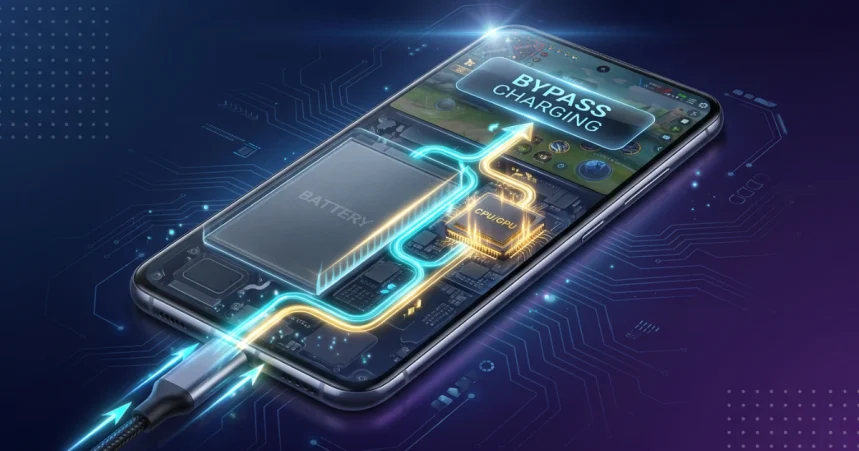
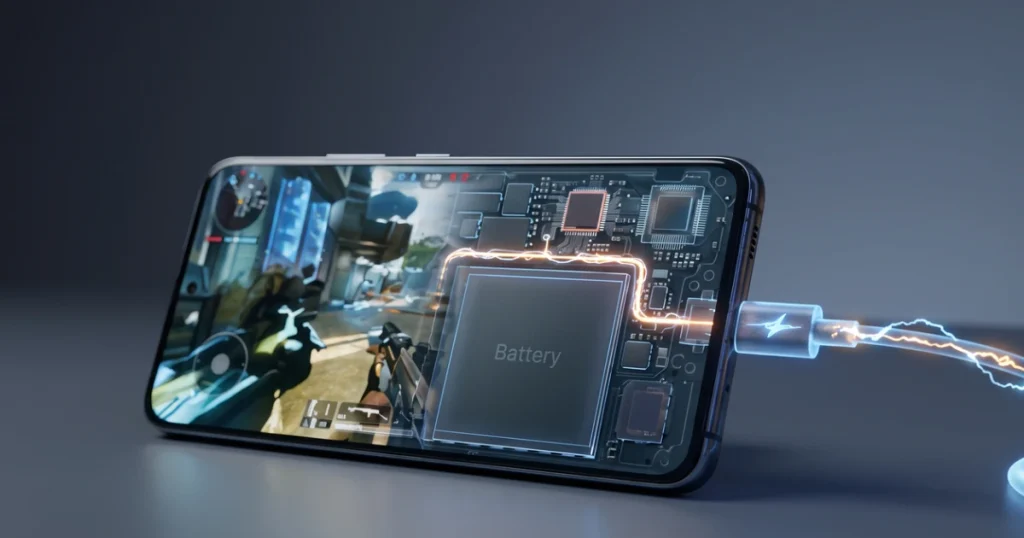
Bypass charging in smartphones is a power-management feature that delivers electricity directly from the charger to the phone’s motherboard and processor, effectively bypassing the battery entirely.
- How Does Smartphone Bypass Charging Work?
- Bypass Charging vs. Normal Charging vs. 80% Charge Limit
- Bypass Charging: The Secret to Longer Battery Life and Faster Performance
- When and Why You Should Use Bypass Charging
- Which Phones Support Bypass Charging?
- Does iPhone Have Bypass Charging?
- How to Turn On Bypass Charging While Gaming
- Samsung Galaxy (Pause USB Power Delivery)
- Infinix & Tecno
- ASUS ROG & RedMagic
- Google Pixel
- OnePlus, Realme & iQOO
- Sony Xperia
- Troubleshooting: Why Is Bypass Charging Not Working or Greyed Out?
- Frequently Asked Questions (FAQs)
Since the battery is neither charging nor discharging while the phone is in use, the device’s temperature drops significantly, performance remains consistent, and the long-term degradation of the battery is slowed down.
If you have ever played resource-intensive games like BGMI, Genshin Impact, or Call of Duty: Mobile – while your phone was charging, you are likely familiar with the frustrations that follow: the back of the phone heats up, the game slows down, and there is a risk of damaging the battery. ‘Bypass charging’ technology is an exceptionally smart solution to these very issues.
Everything you need to know about smartphone bypass charging—how it works, how it compares to normal charging, which phones support it, how to turn it on, and what to do if the option appears to be inactive.
How Does Smartphone Bypass Charging Work?
To understand why bypass charging is important in a smartphone and how it works, you must first know how a device manages power while it is plugged into charge:
- Normal Charging Path: Wall Charger — Battery — Motherboard & Processor
- Bypass Charging Path: Wall Charger — Motherboard & Processor (battery remains inactive)
Lithium-ion batteries naturally generate heat when they charge, and they generate more heat when they discharge under a heavy workload. Doing both at the same time creates a thermal bottleneck. To protect the hardware, your phone triggers thermal throttling, deliberately slowing down the CPU and GPU, while the sustained heat permanently reduces the battery’s chemical capacity.
When bypass charging is enabled, your phone’s Power Management Integrated Circuit (PMIC) isolates the battery cell and routes a regulated flow of power directly from the adapter to the chipset and display. This keeps the battery at its current charge percentage, eliminating the heat generated during charging and preserving the battery’s charge cycles.
Bypass Charging vs. Normal Charging vs. 80% Charge Limit
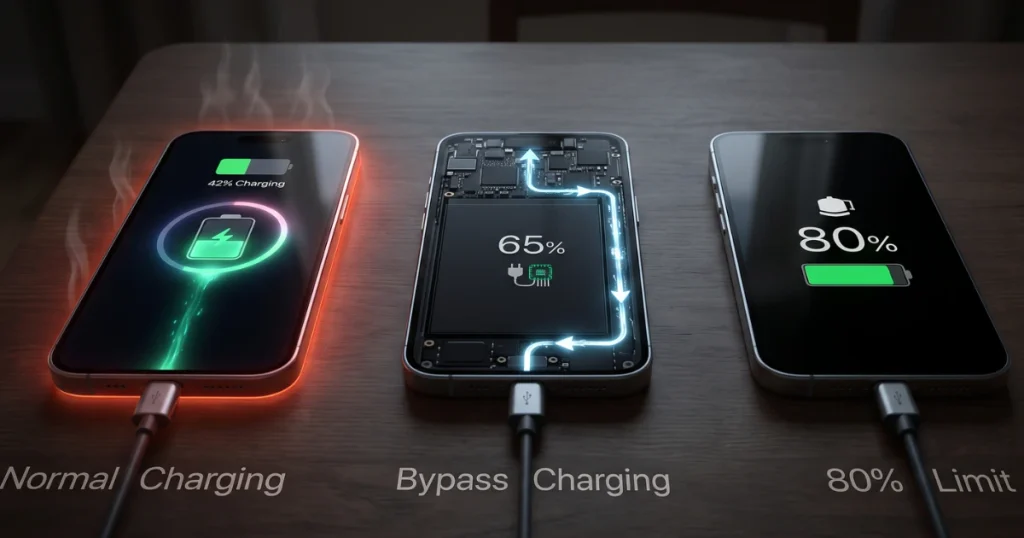
Many smartphones now include multiple battery-protection tools. Here is how bypass charging vs. normal charging and 80% charge limits compare in everyday use:
- Normal Charging (While Using):
- Power Path: Charger → Battery → System; 2. Battery Percentage: Increases slowly; 3. Heat Generation: High (especially under heavy load); 4. Charge Cycles Used: High (constant micro-cycling); 5. Best Use Case: Quick top-ups when idle;
- 80% Charge Limit:
- Power Path: Charger → Battery until 80%, then pauses/bypasses; 2. Battery Percentage: Charges up to 80%, then holds; 3. Heat Generation: Low once 80% cap is reached; 4. Charge Cycles Used: Low (avoids high-voltage 80%–100% stress); 5. Best Use Case: Overnight charging & desk use;
- Bypass Charging:
- Power Path: Charger → System directly (at any set %); 2. Battery Percentage: Stays frozen at current level; 3. Heat Generation: Very low immediately; 4. Charge Cycles Used: Virtually zero while active; 5. Best Use Case: Gaming, streaming, GPS navigation;
Bypass Charging: The Secret to Longer Battery Life and Faster Performance
Let’s now explore how Bypass Charging provides benefits, as well as the potential drawbacks of using it.
Bypass Charging Benefits
- Significantly Cooler Temperatures: Removing battery charging heat keeps your phone 3°C to 7°C cooler during heavy workloads.
- Sustained Peak Performance: Without heat buildup, your processor avoids thermal throttling, delivering smoother, more consistent frame rates (FPS) over multi-hour sessions.
- Longer Battery Lifespan: Lithium-ion batteries wear out from two primary factors: heat and charge cycles. Bypassing the battery minimizes both, helping your phone retain 80%+ battery health for years longer.
- Lower Risk of Battery Swelling: Chronic overheating while plugged in is a leading cause of swollen batteries. Direct power routing removes that stress.
Bypass Charging Disadvantages
- Your Battery Will Not Charge: Because power skips the battery, your percentage stays frozen. If you start a two-hour session at 40%, you will unplug at 40%.
- Strict Charger Requirements: Standard 10W or 15W bricks usually cannot run a modern flagship directly. Most phones require a USB-PD (Power Delivery) charger with PPS support rated at 25W or higher.
- Tethered Mobility: You have to stay connected to a wall outlet or a high-output power bank, which can limit how comfortably you hold the device.
- App Restrictions on Some Brands: Certain manufacturers restrict bypass charging strictly to games launched through their gaming hub, preventing you from using it during video editing or navigation.
More Read
When and Why You Should Use Bypass Charging
You do not need bypass charging for casual messaging or overnight charging. It delivers the biggest impact during high-drain, plugged-in scenarios:

- Competitive & Long Gaming Sessions: Prevents frame drops and sweaty hands during extended 60fps–120fps gameplay.
- Car Navigation & Dashcam Use: Running Google Maps with maximum screen brightness on a sunlit dashboard while charging is one of the fastest ways to overheat a phone. Bypass charging keeps temperatures safe.
- Live Streaming & 4K Video Recording: Keeps the device cool during long shoots or livestreams where thermal shutdowns can ruin a take.
- Desktop Mode: Ideal when using your phone plugged into an external monitor (such as Samsung DeX) for hours at a time.
Which Phones Support Bypass Charging?
Although originally limited primarily to gaming phones, the ‘bypass charging’ feature is now widely available across a range of flagship and mid-range smartphones. Manufacturers often market this feature under various different names:
| Brand | Feature Name | Supported Series & Availability |
|---|---|---|
| Samsung | Pause USB Power Delivery | Galaxy S-series (S22 and newer), Z Fold & Z Flip (4th gen and newer), select Galaxy A-series (A55, A56 and newer) |
| ASUS | Bypass Charging | ROG Phone series (ROG Phone 5 and newer), Zenfone 10 and newer |
| Sony | H.S. Power Control | Xperia 1 and Xperia 5 series (Mark II and newer) |
| RedMagic | Charge Separation | RedMagic 6 series and newer |
| Infinix | Bypass Charging | GT series, Note 30 series and newer, Zero 30 series and newer |
| Tecno | Bypass Charging | Pova 5 series and newer, select Camon series |
| Google Pixel | Charging Optimization (80% Limit) | Pixel 8 series and newer (automatically bypasses the battery once the 80% cap is reached) |
| OnePlus / Realme / iQOO / Vivo | Bypass Charging | Supported across recent flagship, GT, Neo, and gaming-focused models via OxygenOS, Realme UI, and OriginOS/Funtouch OS |
Note
Availability may vary based on regional firmware and software update versions.
Does iPhone Have Bypass Charging?
There is no manual option to enable ‘bypass charging’ directly for gaming on an iPhone. However, on iPhones that include a ‘Charge Limit’ feature (such as the iPhone 15 series or later models), the device functions much like bypass charging once the battery reaches a set limit (e.g., 80%). At this point, the charging circuit stops sending power to the battery, and the device draws the necessary power directly from the power adapter. While this is effective once the battery reaches the specified limit, it is not as flexible as the gaming modes found on Android phones; on Android, users can enable bypass charging at any time, regardless of the current battery percentage.
How to Turn On Bypass Charging While Gaming
Since the settings for enabling ‘Bypass Charging’ vary by brand, please follow the steps specific to your device:
Samsung Galaxy (Pause USB Power Delivery)
- Plug your phone into a 25W or higher USB-PD PPS charger (your battery must be above 20%).
- Open the Gaming Hub app and tap the More menu (three dots) → Game Booster.
- Scroll down and toggle on Pause USB Power Delivery (or Pause USB PD charging when gaming).
- Launch your game—bypass charging will activate automatically while the game is running.
Infinix & Tecno
- Open a game and swipe from the edge of the screen to launch XArena / Game Mode (or go to Settings → Battery Lab / Marathon Power).
- Toggle on Bypass Charging.
- Choose your preferred activation threshold (typically 20%, 30%, or 40% battery).
ASUS ROG & RedMagic
- Launch a game and swipe open Game Genie (ASUS) or Game Space (RedMagic).
- Tap Bypass Charging (ASUS) or Charge Separation (RedMagic) to turn it on.
- On RedMagic devices, you can also enable it system-wide under Settings → Battery → Charge Separation.
Google Pixel
- Open Settings → Battery → Charging optimization.
- Enable Limit to 80%.
- Once plugged in and charged to 80%, your Pixel automatically powers itself from the cable and bypasses the battery.
OnePlus, Realme & iQOO
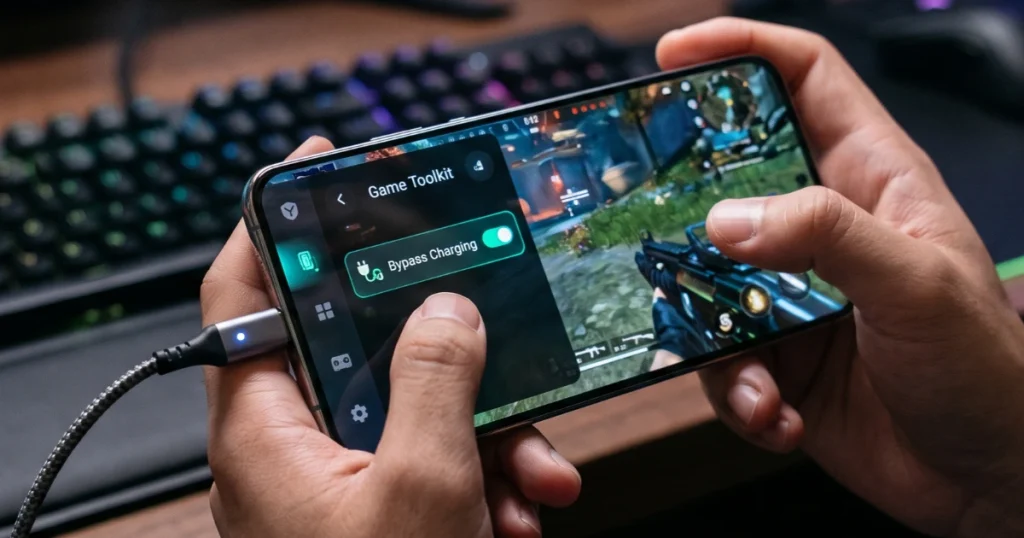
- Swipe open the Game Toolkit / Ultra Game Mode sidebar while playing a game.
- Enable Bypass Charging.
- On newer OnePlus devices running updated OxygenOS, bypass charging can also engage automatically during non-gaming heavy workloads like GPS navigation and video streaming.
Sony Xperia
- Open the Game Enhancer overlay inside any game.
- Go to Settings and toggle on H.S. Power Control.

Troubleshooting: Why Is Bypass Charging Not Working or Greyed Out?
If you see the toggle in your settings but cannot turn it on, or the phone keeps charging normally, one of these four issues is almost always the cause:
- Your Charger Doesn’t Support USB-PD + PPS: This is the #1 reason bypass charging is greyed out, especially on Samsung Galaxy phones. Standard USB-A chargers, older fast chargers, or cheap third-party bricks cannot negotiate the variable voltage required to power the motherboard directly. Switch to an official or certified 25W–45W+ USB-C PD PPS charger and a USB-C to USB-C cable.
- Your Battery Percentage Is Too Low: Most phones block bypass charging if your battery is below 20% or 30% as a safety buffer in case the cable gets bumped out. Charge past the threshold first, then toggle it on.
- You Aren’t Inside a Recognized Game: On brands like Samsung and Sony, bypass charging only engages while an app registered as a game is actively on screen. Exiting to the home screen immediately resumes normal charging.
- Outdated System or Gaming Hub Apps: Check the Galaxy Store, Play Store, or system settings to ensure apps like Game Booster, Game Genie, or Battery Lab are updated to their latest versions.
Frequently Asked Questions (FAQs)
Is bypass charging good for battery health?
Yes. Bypass charging is one of the best features for preserving long-term battery health. By preventing heat buildup and halting charge/discharge cycles while your phone is plugged in under heavy load, it significantly slows down chemical aging and capacity loss.
If bypass charging is on, can I use my phone normally without damaging my battery while it is charging?
Yes. You can game, stream, record video, or browse normally without harming your battery. Because power flows straight from the wall adapter to the motherboard, the battery experiences virtually zero electrical or thermal stress. Just remember that your battery percentage will not go up until you disable the feature.
Does bypass charging work with a power bank?
Yes, as long as the power bank supports USB-PD with PPS and outputs enough wattage (typically 25W or higher). Basic 10W–18W power banks will not trigger bypass charging on most phones and will default to normal charging instead.
Does bypass charging drain the battery?
Generally, no – your battery percentage should stay flat. However, during extreme peak loads (such as max-brightness 120fps gaming on 5G), if your phone briefly demands more wattage than your charger can supply, the system may sip 1% to 2% from the battery to prevent a shutdown. Using a 45W+ PD PPS charger eliminates this completely.
Can I leave bypass charging on all the time?
It is completely safe to leave enabled, though it isn’t always practical. If you leave a system-wide bypass toggle on, your phone won’t recharge when you plug it in. The best habit is to use bypass charging strictly during plugged-in heavy use (gaming, navigation, streaming) and let normal charging or an 80% charge limit handle your daily top-ups.